Payments
General
The payment page does not display correctly.
Try opening https://mudfish.net/admin/credits/buy directly. If the problem persists, clear your browser's cache and try again, or open the link in another browser.
I purchased credits, but my balance is still empty.
Check whether your payment appears in your purchase history.
If the payment appears but you have no credits, check whether you are using a different Mudfish account. If the payment does not appear, it may not have been processed correctly. Contact the Mudfish forums or private support.
I paid but lost the payment!
Apple InApp Purchase
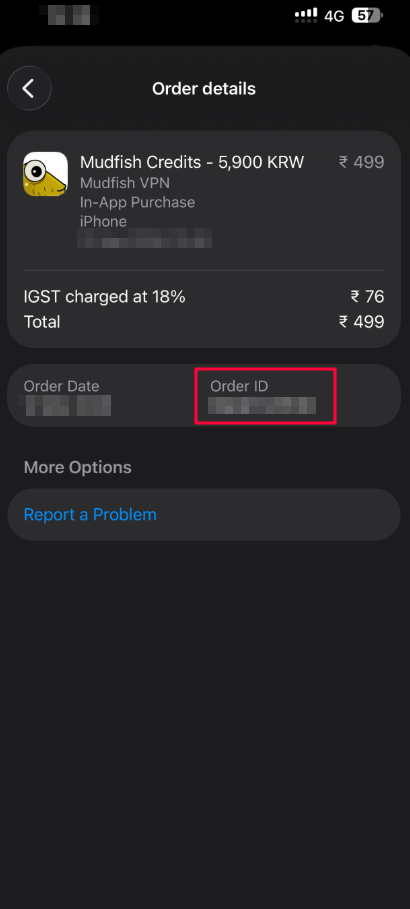
To find your payment, please visit View your purchase history link and try to search the payment history from Apple.
At there, you can find the "Order ID" for your payment (e.g. it looks like
MLV02GBTBZ string pattern).
Then please create the private support topic at here. We'll help your payment issue.
Google PlayStore
To verify your payment, we need your transaction ID from the receipt. Normally the receipt is found at your email account.
For example, the transaction ID looks like GPA.3368-9483-0815-10221
format. Please tell your ID to us if you lost your payment.
Google Play shows "Unknown error: 6" and I cannot proceed with payment.
Error code 6 indicates a communication problem with the Google Play app on your phone. It can have several causes. Try the following:
-
Restart your device and try the purchase again.
-
Check that Google Play is up to date. Open the Google Play app, go to Settings from its side menu, and check the version under "About". Update it if needed, then try the purchase again.
-
If the problem persists, clear the Google Play services cache and retry. See Keep your device and apps working with Google Play services for instructions.
If none of these steps helps, contact the Mudfish forums.