Viewing browser extension logs
· One min read

When using the Mudfish browser extension, you may encounter unexpected problems whose cause is unclear and need help from an administrator.
The extension's logs can help narrow down the problem. This article explains how to access them.
How to open the Console
-
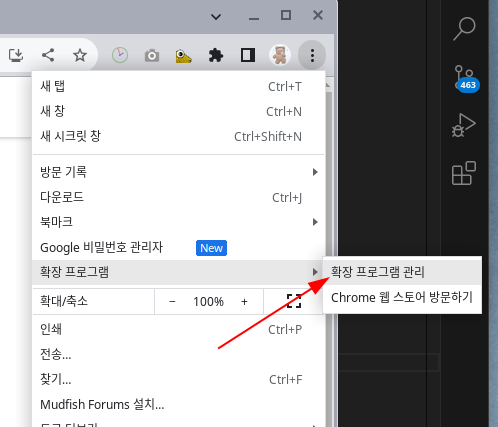
Open the extension management page.
-
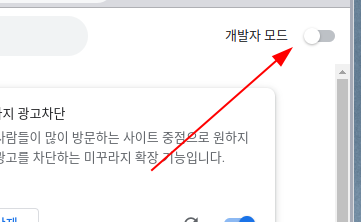
Enable "Developer mode" in the upper-right corner of the Extensions page.
-
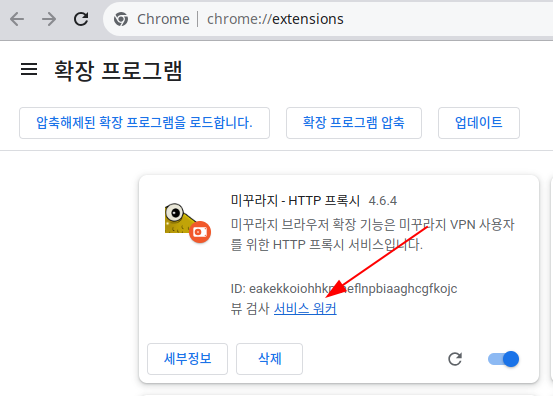
Find "Mudfish - HTTP Proxy" and click "service worker".
-
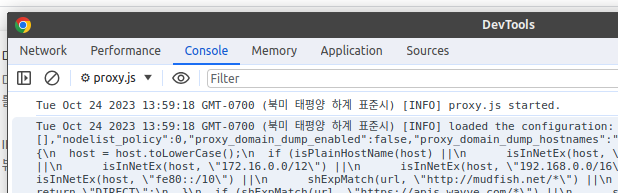
In the DevTools window that opens, select "Console" to view the browser extension's logs.
warningNever share screenshots of this DevTools window or copy and paste its entire contents for others. This debugging output exposes sensitive information, including your password, in plain text.
What to look for in the browser extension logs
- Whether the Console contains any WARN or ERROR messages.
- Whether the
pac_scriptsettings are configured correctly.