Accessing Korean streaming services from abroad

Version 4.6.6 of the Mudfish WebExtension introduced a redesigned menu that lets you route only selected sites through Mudfish without editing PAC scripts as described below.
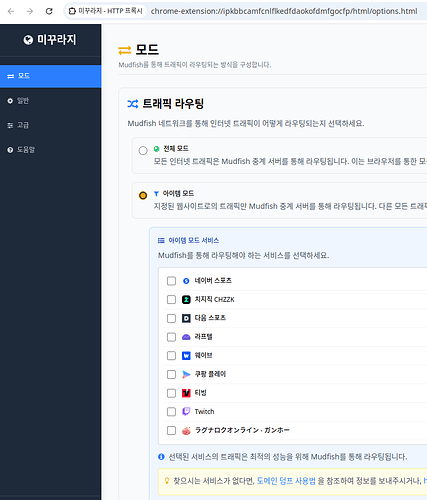
Upgrade to the latest extension version to use this feature. You can download the extension at https://mudfish.net/download.
When living abroad, you may find that Korean streaming services block access based on your location. Using a VPN for all traffic can also cause buffering because of bandwidth limits. This tip provides a PAC script for the Mudfish browser extension that bypasses these restrictions without slowing down the stream.
In this example, only the requests related to location restrictions go through Mudfish. The stream itself uses your regular Internet connection.
Script
function FindProxyForURL(url, host) {
  host = host.toLowerCase();
  if (isPlainHostName(host) ||
      isInNetEx(host, "127.0.0.0/8") ||
      isInNetEx(host, "10.0.0.0/8") ||
      isInNetEx(host, "172.16.0.0/12") ||
      isInNetEx(host, "192.168.0.0/16") ||
      isInNetEx(host, "fc00::/7") ||
      isInNetEx(host, "fe80::/10") ||
      host == "mudfish.net") {
        return "DIRECT";
  }

  if (host == "apis.naver.com" ||
      host == "api-gw.sports.naver.com" ||
      host == "api.chzzk.naver.com" ||
      host == "api.laftel.net" ||
      host == "api.tving.com" ||
      host == "apis.wavve.com" ||
      host == "bill.tving.com" ||
      host == "comm-api.game.naver.com" ||
      host == "gw.tving.com" ||
      host == "kakaotv.daum.net" ||
      host == "laftel.net" ||
      host == "tv.kakao.com" ||
      host == "tv.naver.com" ||
      host == "user.tving.com" ||
      host == "usher.ttvnw.net" ||
      host == "watcha.com" ||
      host == "www.coupangplay.com" ||
      host == "www.tving.com" ||
      host == "myip.mudfish.net") {
      return "{0}";
  }
  return "DIRECT";
}
This script routes only the specified domains through Mudfish and sends everything else through your regular Internet connection. It covers the following streaming services:
- Naver Sports
- Naver CHZZK
- Daum Sports
- Laftel
- Wavve
- Coupang Play
- TVING
- Twitch 1080p
Setup
-
Install the Mudfish browser extension from https://mudfish.net/download.
-
Open the extension's settings, select "Advanced" on the left, and find the PAC section.
-
Copy and paste the script above, click "Apply", and close the settings.
-
Connect the Mudfish browser extension. For Korean streaming services, select a Mudfish node in South Korea.