Reporting a GamePing problem
Use Report a problem in the app to send a description and diagnostic information to Mudfish support. Reports are sent privately.
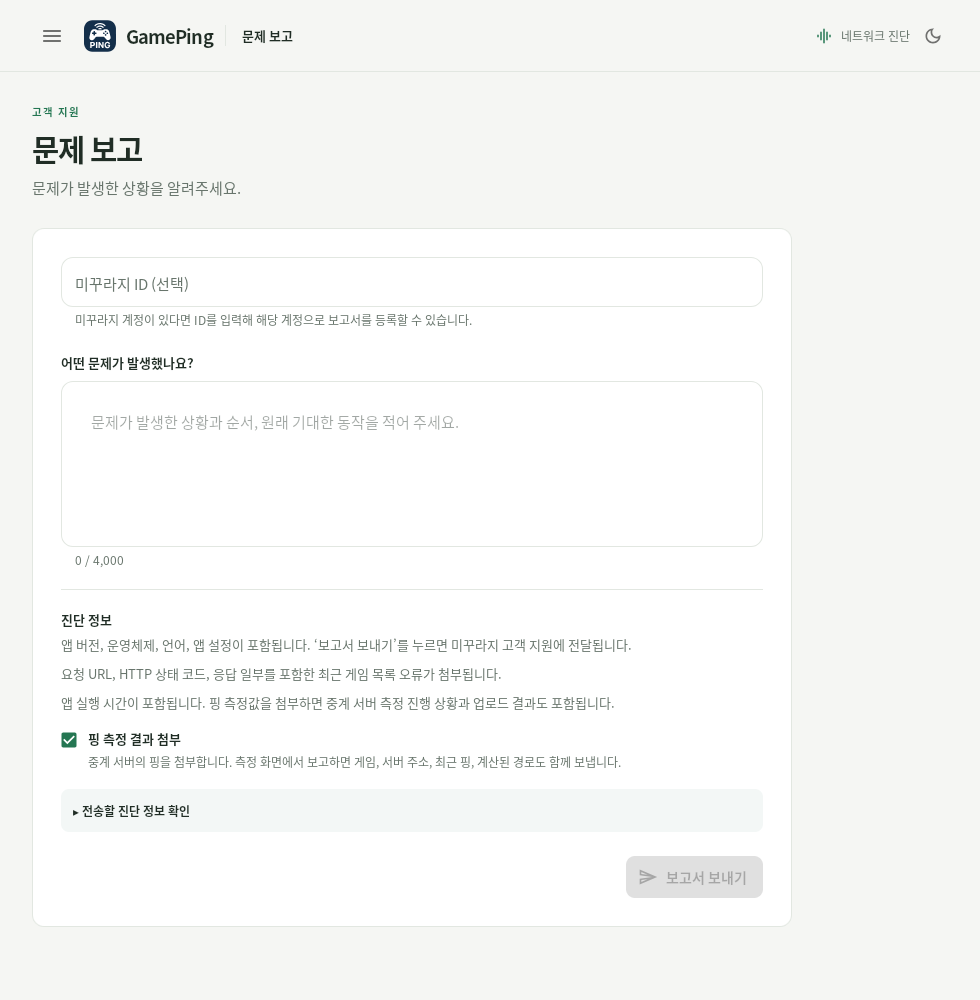
In this Korean screenshot, 어떤 문제가 발생했나요? is What went wrong?. Enter your description there and check whether to include measurements. 보고서 보내기 (Send report) is disabled while the description is empty.
Send a report
- Select Report a problem on the measurement screen where the issue occurred. This lets you attach that screen's game, server, and recent measurements. For list or settings problems, use ☰ → Report a problem.
- If you have a Mudfish account, enter your ID under Mudfish ID (optional) to register the report under that account. You can also leave it empty and still send the report.
- Describe the problem under What went wrong?. A description is required, with a limit of 4,000 characters.
- Choose whether to leave Include ping measurements selected. It is on by default.
- Expand Preview diagnostic information to review what will be sent.
- Select Send report.
- When Report received appears, copy and keep the Report ID. You can use it when following up about the same issue.
Describe the steps you took, what you expected to happen, and what actually happened. For example:
I used the app on my home Wi-Fi at about 9 p.m. today. When I select the Japan server for game X in the game library, Current ping keeps showing “Measurement failed”. Servers in other regions show numbers. The error says “...”.
For measurement problems, open the report directly from the measurement screen. Opening it from the menu does not automatically attach the direct ping history for a particular game server.
Information included in a report
When you select Send report, the following diagnostics are sent along with your description and the ID you entered, if any.
| Category | Included information |
|---|---|
| Basic information | App version, operating system and device architecture, language, theme, concurrent ping test setting, app uptime, and the screen from which the report was opened |
| List information | Number of loaded games, list errors, and details such as recent request URLs, response status codes, and response excerpts |
| When Include ping measurements is selected | Relay node ping, test progress, and result upload status |
| When opened from a measurement screen with Include ping measurements selected | Selected game and server address, recent direct ping results, calculated routes, and route errors |
Clearing Include ping measurements excludes measurement data from the report. Basic information and list error information are still included. This option only controls report attachments; it does not stop the app's automatic relay tests.
If the report will not send
- The Send report button is disabled: Check that the description is not empty or longer than 4,000 characters, and wait for diagnostic information to load.
- Could not collect diagnostics.: Select Retry on the screen.
- The report is too large. Turn off measurement attachments and try again.: Clear Include ping measurements, then send again.
- Could not send the report. Your description has been kept. Please try again.: Check your internet connection and try again. Your description remains on the current screen after a failed attempt.
Copy any description you need to keep before leaving the screen or quitting the app. If sending continues to fail, or the app itself will not open, contact the Mudfish Forums.