Reading GamePing results
Start by checking how low the average ping is, how steady the graph is, and whether measurements keep failing. Look at several measurements together rather than relying on a single number.
Direct connection ping
Direct connection ping is measured directly to the selected server through your device's current internet connection. If another VPN is enabled, it may affect the measurement path. Turn off the VPN to check your normal connection.
| Screen item | Meaning | What to look for |
|---|---|---|
| Current ping | The most recently measured response time | Does it spike occasionally, or stay high? |
| Average ping | The average of recent successful measurements | For the same server, a lower value generally means a faster response. |
| Std Dev | Standard deviation: how much the measured ping varies | A smaller value means steadier ping. Read it alongside the average. |
| Live ping graph | Ping over time | The horizontal axis is time and the vertical axis is ping in ms. A spike means a slower response at that point. |
For example, 48 → 50 → 49 → 51ms is fairly steady.
25 → 150 → 30 → 180ms shows large changes in response time.
One low reading does not mean the connection stays stable.
The app labels standard deviation as follows:
| Standard deviation | Label |
|---|---|
| Below 10ms | Very stable |
| At least 10ms but below 30ms | Stable |
| 30ms or more | Unstable |
These labels describe how much ping varies. Even a high average ping can be marked “Very stable” if it stays consistent. Standard deviation is also zero after just one successful measurement, so collect enough readings before judging.
Failed measurements and no data
If a measurement fails, Current ping may show — and an error message.
If no measurement has succeeded yet, Average ping and Std Dev also show
No data. — does not mean 0ms.
For example, 3 of 30 recent measurements failed (10%) is the proportion of recent attempts that did not receive a valid response. Failed measurements are excluded from the average and standard deviation, and may appear as gaps in the graph.
This percentage is not necessarily the actual packet loss rate during a game. A server that does not respond to test requests, a connection timeout, or a device error can also cause a failed measurement. If many measurements fail even though the average ping is low, see Troubleshooting.
The statistics and graph cover up to the 30 most recent attempts. Leaving the app running longer does not turn them into statistics for the entire session. Reopening the measurement screen resets them.
Estimated routes with Mudfish VPN
Estimated routes with Mudfish VPN near the bottom of the screen shows calculations for connections through Mudfish relay nodes. Path identifies the relay nodes along the route, while Average ping and Std Dev show estimates for that route.
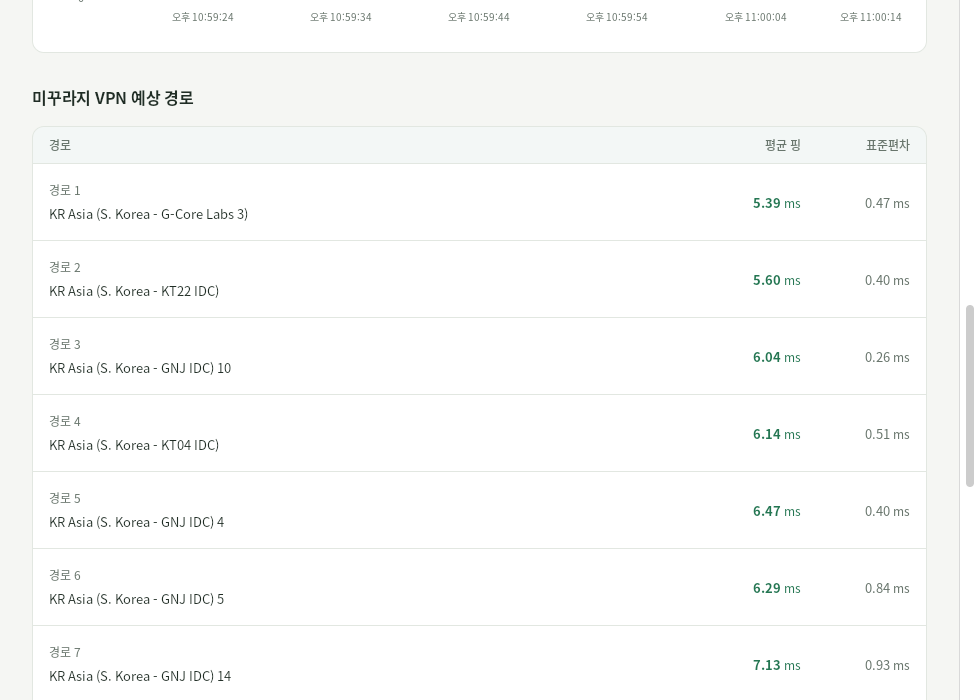
Scroll below the live ping graph to find this table. The Korean columns 경로, 평균 핑, and 표준편차 correspond to Path, Average ping, and Std Dev. These are route estimates, not measurements taken over an actual VPN connection.
| Type | Meaning |
|---|---|
| Direct connection ping | Measured from your device now |
| Estimated routes with Mudfish VPN | Calculated assuming a connection through Mudfish VPN |
If a valid estimated ping is lower than the measured direct average, a comparison such as 30% lower estimated ping may appear. For example, a direct ping of 100ms and an estimate of 70ms suggest ping could be about 30% lower. This does not mean downloads would be 30% faster.
Ping over an actual VPN connection may differ from the estimate. Viewing this screen or selecting Explore Mudfish VPN does not connect you to a VPN. That button opens a Mudfish information page in your browser.
To try the separate VPN program, see Getting started with Mudfish VPN.
You can still check direct ping when No routes available. appears. Shortest path calculation results are unreliable appears if a route has an estimated ping above 1,000ms. In that case, check again later instead of using that estimate to judge connection quality.
If the in-game ping is different
GamePing tests the server addresses and measurement methods registered in its list. The servers used during gameplay or the game's ping calculation may differ, so its numbers will not always match GamePing.
First check that you selected the right game and server region. Use GamePing as a reference for comparing connections, and also consider responsiveness during actual gameplay.