Full VPN mode
If your data plan is PPT (Pay Per Traffic) and you're using Full VPN mode, please use this feature carefully because it could consume a lot of mudfish credits if you uses it wrong.
If it turns on, all network traffics on your computer would be passed to Mudfish node you selected.
Normally, Mudfish routes only traffic covered by your equipped items. Full VPN mode is useful for games that are not listed or that use peer-to-peer connections. It overrides all item settings, including their selected nodes; you do not need to turn each item off.
All network activity on the computer counts toward Pay Per Traffic usage while this mode is enabled, including web browsing, torrents, downloads and background applications. Exit Mudfish when you finish. If this repeatedly causes high credit usage, consider the Subscription plan, taking its speed limits into account.
How to turn on/off
Step by step
-
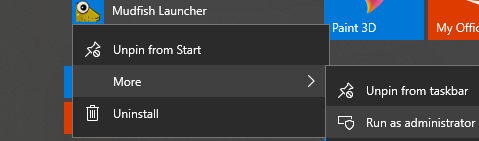
Run Mudfish Launcher as Administrator and sign in with your mudfish account.
-
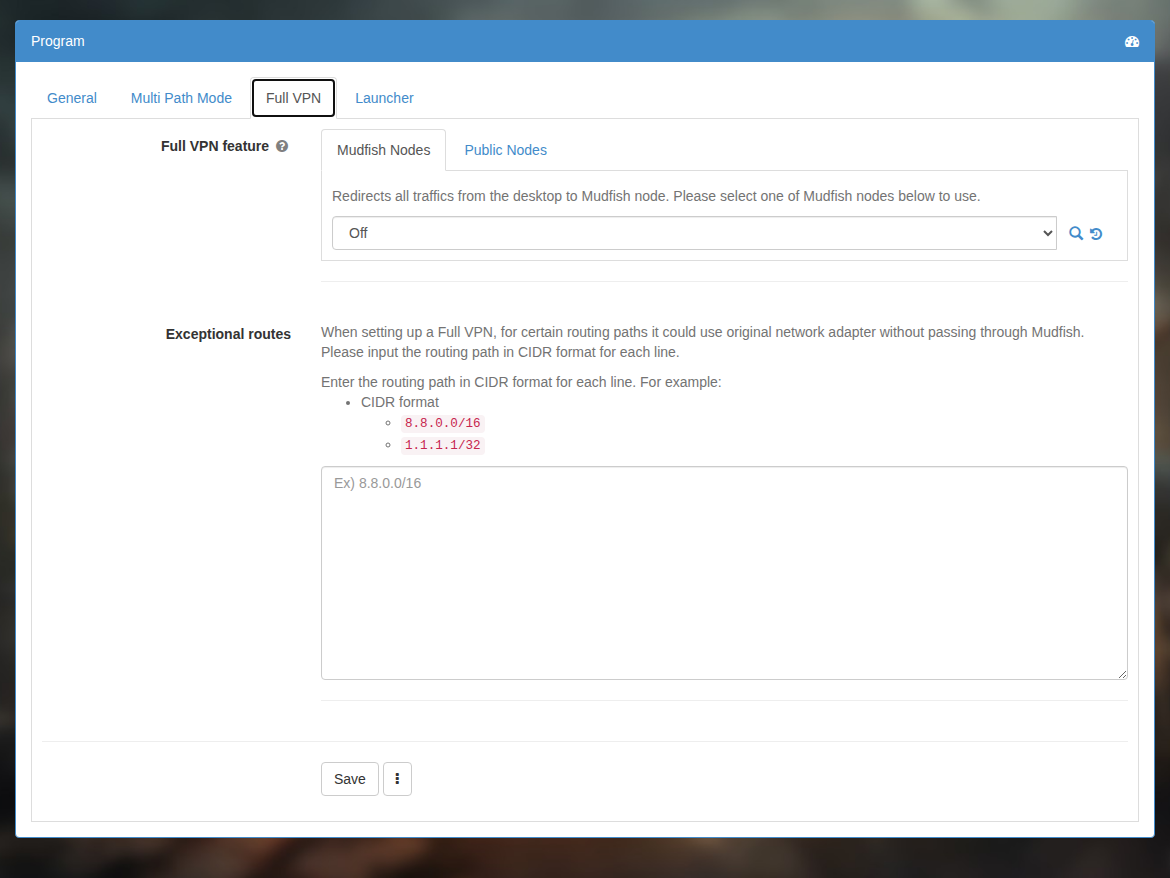
Moves to 'Setup → Program' menu then select 'Full VPN' tab.
-
Select a node you'd like to use and save the configuration. Use the magnifying-glass icon to inspect node status in a popup. Restart is required to be applied.
-
Please make sure that your public IP is changed with visiting https://myip.mudfish.net URL. If it works correctly, it'd show proper messages.
Exclusions
In “Setup → Program → Full VPN”, you can exclude routes so that they use your normal connection. Enter one CIDR range per line, for example:
8.8.0.0/16
1.1.1.1/32
On Windows, enabling WFP Item mode alongside Full VPN also lets you exclude a process by name:
P:chrome.exe
This example excludes Chrome. Process exclusions require WFP Item mode.
FAQ
My data plan is 'Subscription'. However I can't use Full VPN mode!
Please check that you equipped any paid item. To use Full VPN mode, at least you should equip one paid item.
Is it possible to use 2 different nodes for full vpn mode?
No. It's not supported yet officially. However if your data plan is pay-per-traffic and familiar with Create Custom Item section. You can create your own item for manual Full VPN mode with the following routing entries:
2.0.0.0/7
4.0.0.0/6
8.0.0.0/5
16.0.0.0/4
32.0.0.0/3
64.0.0.0/2
128.0.0.0/2
192.0.0.0/3
However please note that this doesn't let your desktop use the private DNS server of Mudfish to detour the DNS poisoning.
My Internet connection stops working after I enable Full VPN.
A DNS server with a private IP address can cause this problem. Try manually setting a public DNS server on the network adapter that provides your Internet connection instead of using its automatic DNS setting.
Full VPN appears to be configured, but it does not take effect.
- Open “Status → Processes” and check the Core log for WARN or ERROR messages. Follow the corresponding error-code instructions.
- If the log shows no problem, check the interface metric of your Internet adapter. If it is lower than the metric of the TAP-Win32 adapter V9 used by Mudfish, Full VPN may not work. Set the Internet adapter's metric higher than the TAP adapter's metric.
Does Full VPN also affect other devices connected to my router?
When you run the desktop version, it affects only that computer. Other phones, laptops and computers on the same router are unaffected.
Does Full VPN deduct additional credits on the Subscription plan?
No. You must first equip a paid Subscription item to enable it.
How can I reduce excessive credit usage on Pay Per Traffic?
Close other applications that generate network traffic, or switch to the Subscription plan if its speed limit suits your needs. Shared CDN or cloud addresses can also affect item traffic; see the existing guides on CDNs and Amazon EC2 and Twitch.