TAP driver FAQ
The TAP driver does not work.
Mudfish v5.5.8 and later also support Wintun as an alternative to OpenVPN's TAP
driver. Enable Expert Mode,
then open “Setup → Program → Launcher” to select it. You can also start
Mudfish Launcher with -N; see
mudrun options.
First check that the TAP-Win32 Adapter V9 is installed and enabled. On Windows XP, open “Start → Settings → Control Panel → Network Connections”. If the adapter is disabled, enable it.
If the adapter is missing, work through the following installation checks. The XP and older TAP-driver procedures below apply to legacy installations.
Check the installer
Download Mudfish from the official website. Unofficial installers from blogs or forums may have been modified and may fail to install the driver correctly.
Use the installer that matches your operating system's 32-bit or 64-bit architecture.

Windows XP network repair
For Windows XP, the historical guide uses WinSock XP Fix to repair damaged network registry settings. Back up the registry first.
Install the TAP adapter manually
Download the archive for your platform:
- Extract the archive to a folder.
- Run
remove.batto remove the existing TAP-Win32 Adapter V9. - Run
install.bat. - Check the network adapters in Control Panel for TAP-Win32 Adapter V9.
If it still does not appear, check “Control Panel → Device Manager → Network adapters” for a device marked with an exclamation point.
Test installation through OpenVPN
Mudfish's TAP adapter comes from the OpenVPN project. You can test the same type of adapter with OpenVPN:
- Download the appropriate 32-bit or 64-bit Windows installer from OpenVPN Community Downloads.
- Obtain a configuration from VPNBook.
The historical example uses
VPNBook's US1 configuration archive.
Extract its configuration files into
C:\Program Files\OpenVPN\configorC:\Program Files (x86)\OpenVPN\config. - Run “OpenVPN GUI” as administrator.
- Right-click its system-tray icon and try connecting with one of the VPNBook configurations. Use “View Log” to inspect the result.
If this test works, the TAP driver should also be able to work with Mudfish.
Try an NDIS 6 TAP driver
Older Mudfish packages included an NDIS 5 TAP driver, which may not work well on newer Windows versions. For those packages:
- Install Mudfish and its bundled TAP driver.
- Install the NDIS 6 TAP-Windows driver from OpenVPN Community Downloads. The version used when the original guide was written was tap-windows-9.21.2.exe.
- Start Mudfish again with the replacement driver.
Check whether Windows has disabled device installation
If you are familiar with Registry Editor, check:
HKEY_LOCAL_MACHINE\SYSTEM\CurrentControlSet\Services\DeviceInstall\Parameters\DeviceInstallDisabled
If the value is 1, change it to 0, restart Windows and try installing again.
Check the device-installation log
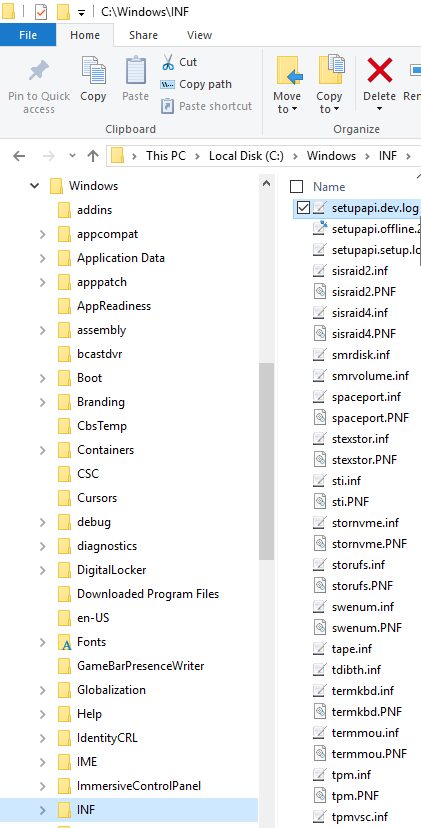
Look for C:\Windows\inf\setupapi.dev.log. If it exists, send it to
support@loxch.com for analysis of the installation failure.
The adapter reports a speed of only 10 Mbps.
TAP-Win32 Adapter V9 is a virtual adapter. The displayed 10 Mbps value is for backward compatibility and does not impose that physical speed limit. Its actual throughput depends on CPU performance.